





Instagram in 2026 hits different. You open it up, and you see that Reels are still there, Stories too, the grid, all the usual stuff.
But the way everything works underneath? That’s where the real shift is.
If you’re a social media manager, you’ve probably felt it already. Engagement patterns are weirder. Content lives longer. Sometimes a post flops for days, then suddenly picks up like nothing happened. And clients keep hitting with the same question: “Is Instagram even worth it anymore?”
Short answer: yes, it is.
But real talk? Only if you know what you’re doing. Here are the Instagram features that actually make a difference in 2026.
1. “Your Algorithm” Dashboard
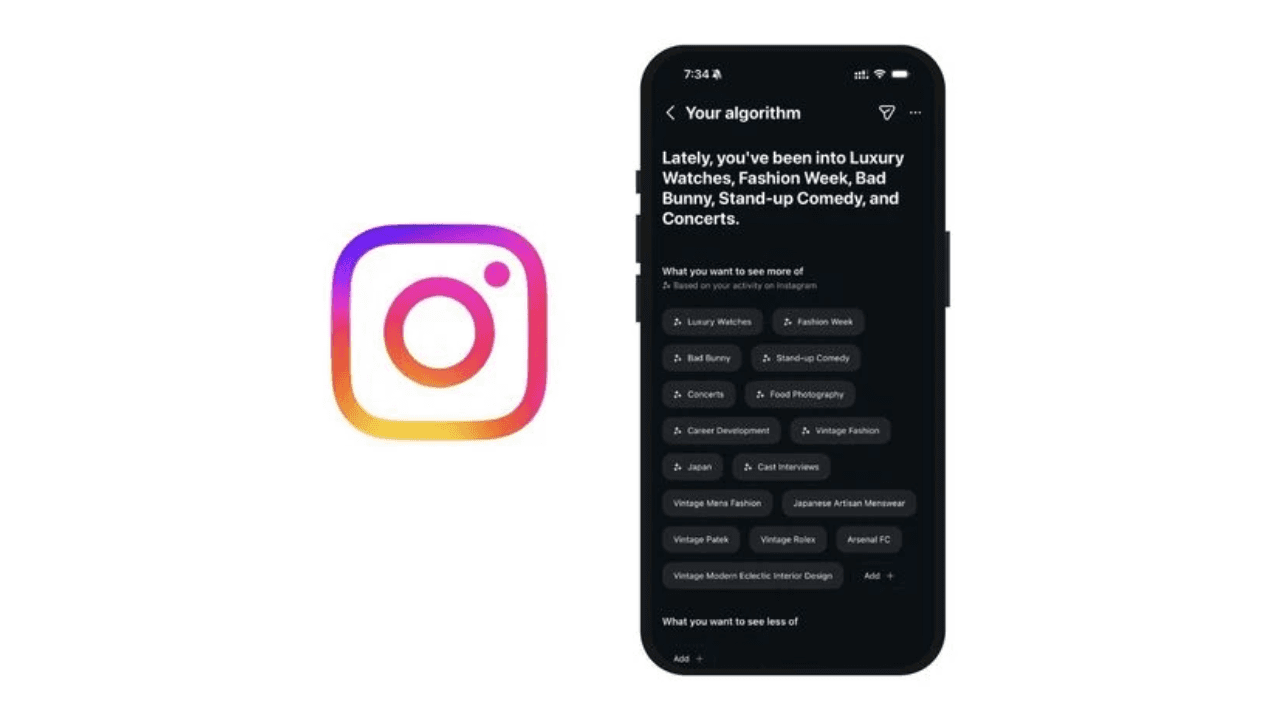
Source: Business Standard / Adam Mosseri's Threads post
Instagram just dropped a new AI feature called Your Algorithm that basically shows you why you keep seeing what you see in your feed. It looks at all the stuff you like, comment on, and watch to figure out what you’re into.
In the Reels tab, there’s this dashboard now where you can straight-up tell Instagram what you want to see more or less of. Pretty simple to use:
To tune your algorithm, follow these simple steps:
Go to your Reels or Explore tabs or Content preferences within Settings.
Under What you want to see more of, tap Add + and type in your interests.
Then, under What you want to see less of, tap Add + and type in whatever topics you’re not interested in.
Quick heads up, though, this is still in testing mode, so you might not have it yet. Instagram’s rolling it out to the rest of the app soon, so everyone should get it eventually.
2. Meta AI Assistant
Meta AI is basically your new sidekick on Instagram. It’s not everywhere for everyone yet, but once you have it, it’s pretty handy for several reasons. Here’s the quick rundown on how to actually use it:
Start a Conversation with Meta AI
If you want to chat directly with the AI for advice or just to mess around:
Head to your Messages and hit Compose (top right).
Under the Suggested list, tap Meta AI.
Type whatever, ask questions, throw out prompts, or just say “Hi.”
Once you’ve started chatting with Meta AI, you can jump back into the conversation anytime from your inbox.
You can also pull Meta AI into an existing conversation with your friends. In any chat, just type “@” and select Meta AI. Enter your question or request for Meta AI, and everyone in the chat will see the answer.
Make or Animate Images
This is the fun part. You can generate images from scratch and even make them move:
Generate: Type /imagine, and then whatever random thing you’re thinking of.
Animate: After the AI makes your image, long-press it, tap Reply, and just type “animate.”
Translate Reels Automatically
Meta AI can now translate your Reels into Spanish, Hindi, and Portuguese, with more languages coming later. The translation actually uses your voice’s sound and tone, so it doesn’t feel weird or robotic. There’s even an optional lip sync feature that matches your mouth movements to the translated audio.
It’s pretty handy if you want to reach people who don’t speak your language. Creators can basically dub and lip sync their Reels for free now, which makes it way easier to build an audience in other countries.
3. Meta AI Business Assistant
If you’ve ever looked at a spreadsheet full of ad data and wanted to just close your laptop and walk away, this is for you. Meta’s rolling out a Business Assistant right inside Ads Manager and the Business Support Home.
It can be used for DM automation, caption generation, and ad optimization. Since this is in beta, keep an eye out for a pop-up in your Ads Manager.
4. Reel Linking

It’s Instagram’s way of making Reels work together instead of just existing on their own. For creators, it’s now easier to organize related content, whether they are part of a larger series or follow-ups to prior Reels.
Why does it matter if you’re running a social media manager? Reel linking turns Reels into actual strategic tools instead of random one-off videos.
It helps you:
Build content series instead of posting in a vacuum
Send viewers to your best content (FAQs, launches, and promos)
Run campaigns where multiple posts need to connect
Give old content a second life
It’s one of the easiest ways to make Instagram feel less all over the place and more like you actually have a plan.
5. Reposts
For social media managers, reposting on Instagram is all about using the built-in “Repost” button for feed posts and Reels or sharing tagged Stories. Always credit the original creator because it builds community, shows you know your stuff, and helps you reach more people when you add your own take or context.
How to Actually Repost
Native Repost (Posts and Reels): Tap the icon with two arrows under any public post or Reel, add a quick note (not a full caption), and share it to your feed. It’ll show up in a separate Repost tab on your profile.
Story Reshares: You can only do this if someone tags you in their post. Just tap to share it straight to your story.
Through reposts, you can share content from creators you work with or feature user-generated content (UGC) from your community. This feature is also a way to bump old but “saveable” content.
6. Shoppable Instagram Reels
Reels are what make Instagram grow right now, and product tagging in Reels is a big deal. People can tap “View products” to check details, save stuff, or buy it on the spot.
If you’ve got a shop set up on Instagram, you can tag products when you post Reels. Then viewers can tap to buy, save, or learn more.
Why tag products in Reels
Drive product discovery. Reels with product tags can show up in the Reels tab, where millions of people might see them. They’ll also pop up in your feed (if you share them there) and on your profile.
Work with creators. Businesses and creators can tag products in Reels to push sales for merch or collabs. Just make sure your business and creator partners are approved to use Instagram shops.
Entertain and educate. Reels are short, fun videos that help you connect with people. Show off products, demo how they’re used, or just get creative to get people interested in your brand.
How to tag products in Reels
Tap Create new and pick Reels, or swipe to the Instagram camera and tap Reels.
Make your Reel. Record it or upload a video from your phone.
Pick a cover image and write a caption. Tap Cover and slide the image at the bottom.
Tap More options, tap "Tag products" and choose the product(s) or collection you want to feature.
All products are reviewed and approved per Meta’s Commerce Policies.
How to Make Sure You Get the Latest Instagram Features

Getting new features on Instagram in 2026 isn’t just about hitting “update.” It’s about how your account’s set up and where you are. Here’s how to make sure you get the new stuff first:
1. Turn on Auto-Updates
Hit up your App Store or Google Play and turn on Automatic Updates. Most updates in 2026 happen in the background without you even noticing, but keeping your app up to date is what gets you the new features.
2. Join the Beta
On Android, look for “Join the Beta” on Instagram’s Play Store page. On iOS, keep an eye out for TestFlight openings. It’s a little buggier, but you’ll get experimental stuff, like new AI font effects, weeks before everyone else.
3. Switch to a Professional or Creator account
Meta almost always gives cool new tools to creators first, like Competitive Insights, the Meta AI Business Assistant, or 24-hour early access for Reels.
4. Offload the App
If everyone else has something and you don’t, try offloading the Instagram app. On iPhone, go to Settings > General > iPhone Storage > Instagram > Offload App. This clears out the junk but keeps your data, and it usually forces the app to re-sync with Meta’s latest features when you reopen it.
Final Thoughts
The key here is to always stay curious. Instagram will keep changing. New features will drop. Algorithms will shift. The social media managers who stay adaptable and who keep learning.
The platform gave us the tools. Now it’s on us to figure out how to use them effectively.
If you’re looking for a comprehensive social media management tool, Sparkum is exactly what you need. Sparkum brings everything into one place: planning, collaboration, and clarity without the clutter.
Join the Sparkum waitlist and get early access!